Minecraft · Java + Bedrock · Free

Minecraft Sign & Book Text Generator

Design coloured, bold, italic Minecraft sign or book text — then copy the /give command straight into your world. You can't type colour codes directly on a sign in survival, so this is how everyone with pretty shop signs and lore books does it.

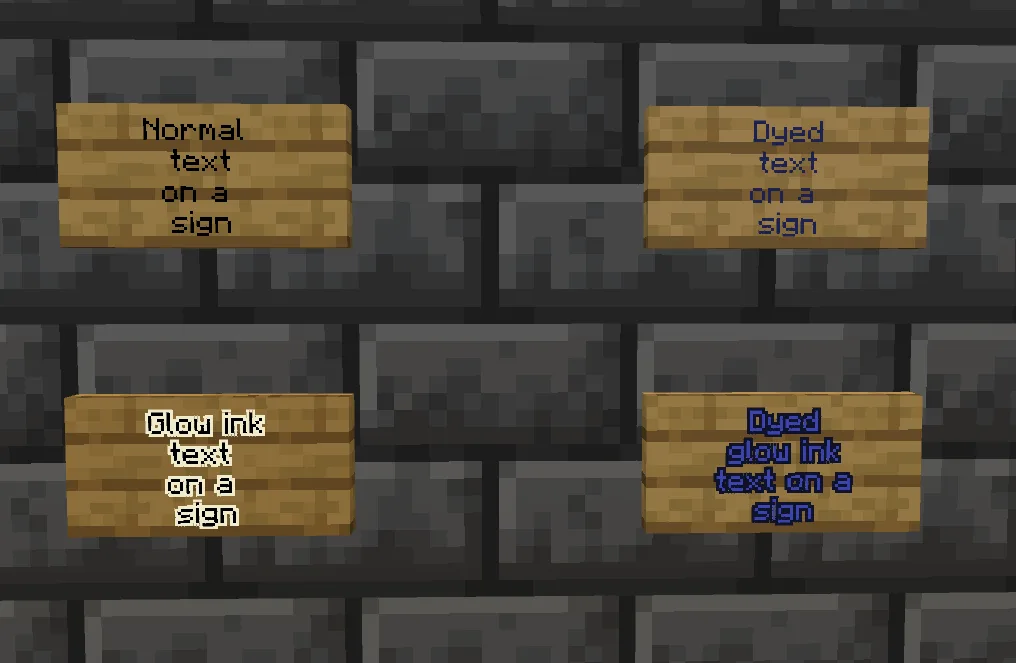
Four Minecraft signs side by side: plain, dyed, glow-ink, and glow-ink + dyed
Four sign looks side-by-side: plain, dyed, glow-ink only, and glow-ink + dyed. All four are possible without commands — see below.

Type your text

Preview

What signs actually are (and why you need this tool)

A sign is a wooden block you can write four short lines of text on. Place one on any wall, floor or fencepost, right-click to type, and everyone in the world can read whatever you wrote. Perfect for labelling chests, marking a hidden door, pointing the way to spawn, or leaving a note for a friend.

The catch: when you write a sign the normal way, Minecraft only lets you put plain black text (or white on dark signs). You can't type in colour, you can't make text bold, and you can't do italic. Which is a shame — coloured signs are one of the classic looks in Minecraft builds.

The way around this is a command: /give. You give yourself a sign that's already got the coloured, bold or italic text baked into it. When you place it, the text appears in the colour you picked. The tool above builds that command for you — you don't need to know any coding.
Two ways to use this — commands or crafting

1

The command way (Java + Bedrock cheats)

  1. Type your text and pick a colour above.
  2. Hit Copy command.
  3. Open your world with cheats enabled, or open to LAN with "Allow Cheats: On" if it's a normal survival world.
  4. Press T (Java) or tap the chat button (Bedrock) to open chat.
  5. Paste the command with Ctrl+V and press Enter.
  6. You'll receive the sign in your inventory — place it as normal.

Doesn't work on servers where you're not the owner (they usually block cheats). On Realms, the owner has to switch on cheats first.

2

The crafting way (any survival world, any edition)

  1. Chop wood and craft Oak Planks.
  2. Craft Sticks (2 planks in a column = 4 sticks).
  3. Craft a plain Oak Sign — 6 planks in the top two rows + 1 stick in the middle-bottom@if(config('app.show_wip_pages')) (see the crafting recipes reference for the exact layout).
  4. Place the sign, right-click, type your text (plain, no colour).
  5. To colour it after placing: right-click the placed sign with a dye in your hand. Any of the 16 dyes works